


Lightning Is Powerful and Complicated#
If you've ever set up a Lightning node, you know. Channel management, liquidity, routing, watchtowers, backups. It's powerful infrastructure, but it's a lot to take on when all you wanted was "let users pay for things."
Most app developers don't need to run a node. They need a payment API. Something that takes "pay this" and returns "paid," without requiring a degree in Lightning Network topology.
That's what NWC gives you. And nostr-core makes NWC trivial.
The Connection String Is the Config#
Someone else runs the wallet infrastructure. Maybe it's a service like Alby. Maybe it's a self-hosted setup. Maybe it's a Cashu mint behind NUTbits. You don't need to know or care.
They give you a connection string:
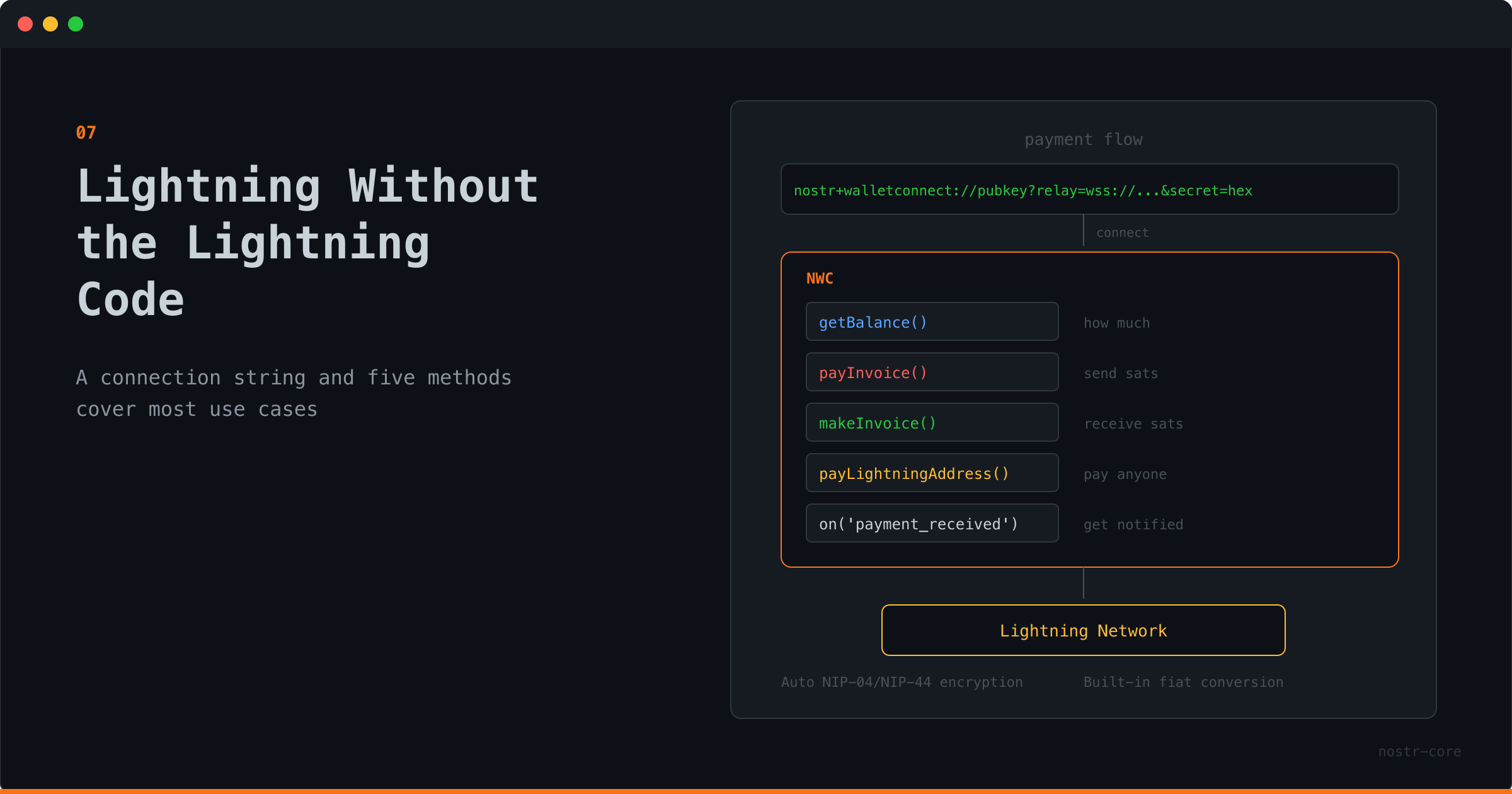
nostr+walletconnect://pubkey?relay=wss://...&secret=hex
That string contains the wallet's identity, the relay to communicate through, and your secret key. Paste it into nostr-core, and you have a wallet.
const nwc = new NWC(connectionString)
await nwc.connect()
Done. No node setup. No channel management. No liquidity planning.
Five Methods for Most Apps#
The reality is that most applications need a small set of payment operations. nostr-core covers them:
Check the balance:
const { balance } = await nwc.getBalance()
Pay an invoice:
const { preimage } = await nwc.payInvoice('lnbc...')
Create an invoice:
const { invoice } = await nwc.makeInvoice({ amount: 50000, description: 'Premium access' })
Pay a Lightning address:
await nwc.payLightningAddress('creator@example.com', 500)
Listen for incoming payments:
nwc.on('payment_received', (data) => {
// Unlock content, update balance, send notification
})
That's it for most apps. A membership site needs makeInvoice and payment_received. A tipping feature needs payLightningAddress. A wallet dashboard needs getBalance and listTransactions.
Fiat Conversion, Built In#
Sometimes your users think in dollars, not sats. nostr-core handles conversion:
const { sats, rate } = await nwc.payLightningAddressFiat('shop@example.com', 25, 'usd')
console.log(Paid ${sats} sats at $${rate}/BTC)
Twenty-five dollars, converted to sats at the current rate, paid to a Lightning address. No extra dependencies. No separate API call for the exchange rate.
What You Don't Write#
Here's what nostr-core handles that you'd otherwise implement yourself:
WebSocket connection to the Nostr relay
Event creation, signing, and serialization
Encryption negotiation (NIP-04 vs NIP-44)
Request/response matching over async relay messages
Timeout handling with specific error types
Lightning Address resolution (LNURL-pay flow)
Fiat-to-sats conversion via exchange rate API
Connection lifecycle and cleanup
That's not a small amount of code. And it's the kind of code where subtle bugs create real problems: payments that hang, connections that leak, encryption that silently downgrades.
nostr-core has solved these problems once, with proper error handling and typed responses. You get the result.
When You Need More#
The NWC class covers the common cases. But nostr-core also exports the building blocks for when you need finer control.
Want to build a custom zap flow? NIP-57 exports zap request and receipt functions. Want to manage relay connections yourself? The Relay and RelayPool classes are available. Want to handle encryption manually for a specific use case? NIP-04 and NIP-44 are exported directly.
The high-level API gets you moving. The low-level exports let you go wherever you need.
Payments Are Just Another Feature#
The best payment integration is the one your users don't think about. They click "pay," it works, they move on.
nostr-core makes that possible by keeping the developer side equally simple. Import the class, connect with a string, call the method. The Lightning complexity stays where it belongs: in the wallet infrastructure, not in your application code.
Lightning payments. One import. One connection string. npm install nostr-core
Originally published at https://nostr-core.netlify.app/blog/07-lightning-without-the-lightning-code.html


Comments0
No comments yet. Start the conversation.